 LIVSHO
Kino: the C engine that plays, scrubs and re-encodes every video on Livsho
One engine in C, both directions: a clock taken from the speaker, a byte store every player shares, scrubbing and 2× speed that never stall the picture, 22 container formats, and a transcoder that makes iPhone and Android uploads come out the same.
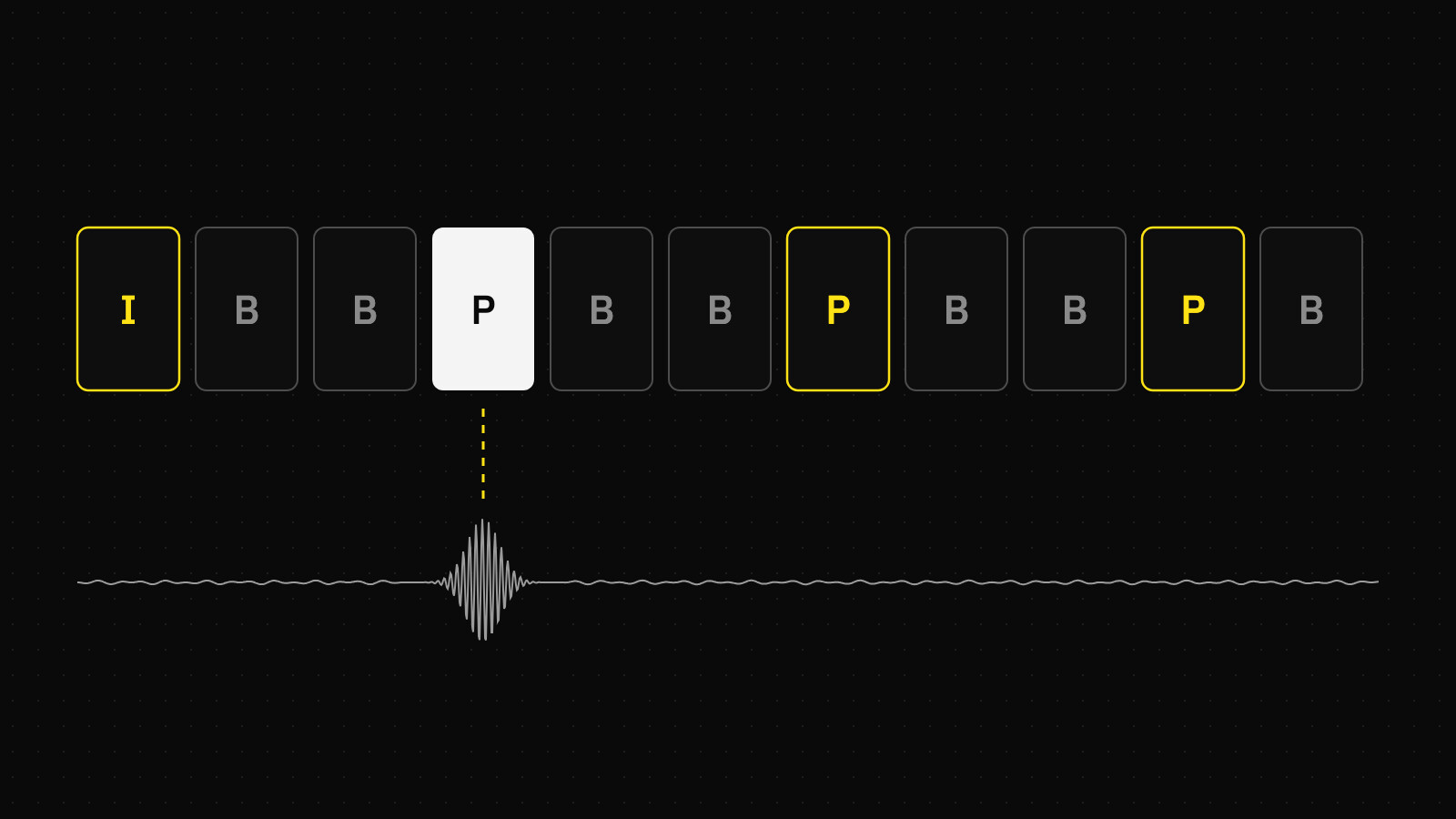
Every video on Livsho goes through one engine we wrote in C, in both directions. When you watch a show replay, a clip, a story or a video in a DM, Kino plays it. When you drag a timeline, Kino shows the frame under your finger. When you swipe to the next clip, Kino has already put its first seconds on disk. When you upload a video, Kino re-encodes it on your phone before it leaves. This post covers how the engine works: a clock taken from the speaker, a byte store shared by every player, scrubbing and speed changes that never stall the picture, 22 container formats, and a transcoder that gives iOS and Android the same output.
One engine, two directions
Kino is about 5,300 lines of C for the engine and a few hundred per platform. A thin Swift or Kotlin shim does HTTP and hands the app its events as JSON. Underneath sits a minimal, LGPL-only build of FFmpeg: libavformat demuxes, libavcodec decodes everything, swscale and swresample convert, and dav1d handles AV1 in software. The platforms only lend their hardware and their screens. On Apple, libavcodec decodes on VideoToolbox. On Android it decodes through its MediaCodec wrappers, straight into the window the app draws. One decode path on both phones means a bug fixed once is fixed everywhere, and the whole engine also runs on a Mac with nothing but a test harness around it.
What the engine does:
- Playback of files and of programs: segments played back to back, which is how a show's recording is stored.
- Exact and keyframe seeks, and scrubbing: the keyframe under a moving finger, decoded on its own.
- Speed from 0.5× to 2× with the voice at its own pitch, changed mid-play without a hitch, and gapless loops.
- Thumbnails: one keyframe fetched by byte range and decoded to an image, without opening a player.
- Prefetch: a clip's first seconds downloaded into the store before anyone opens it.
- Transcoding for uploads: anything the engine can play goes in, H.264 and AAC in MP4 come out.
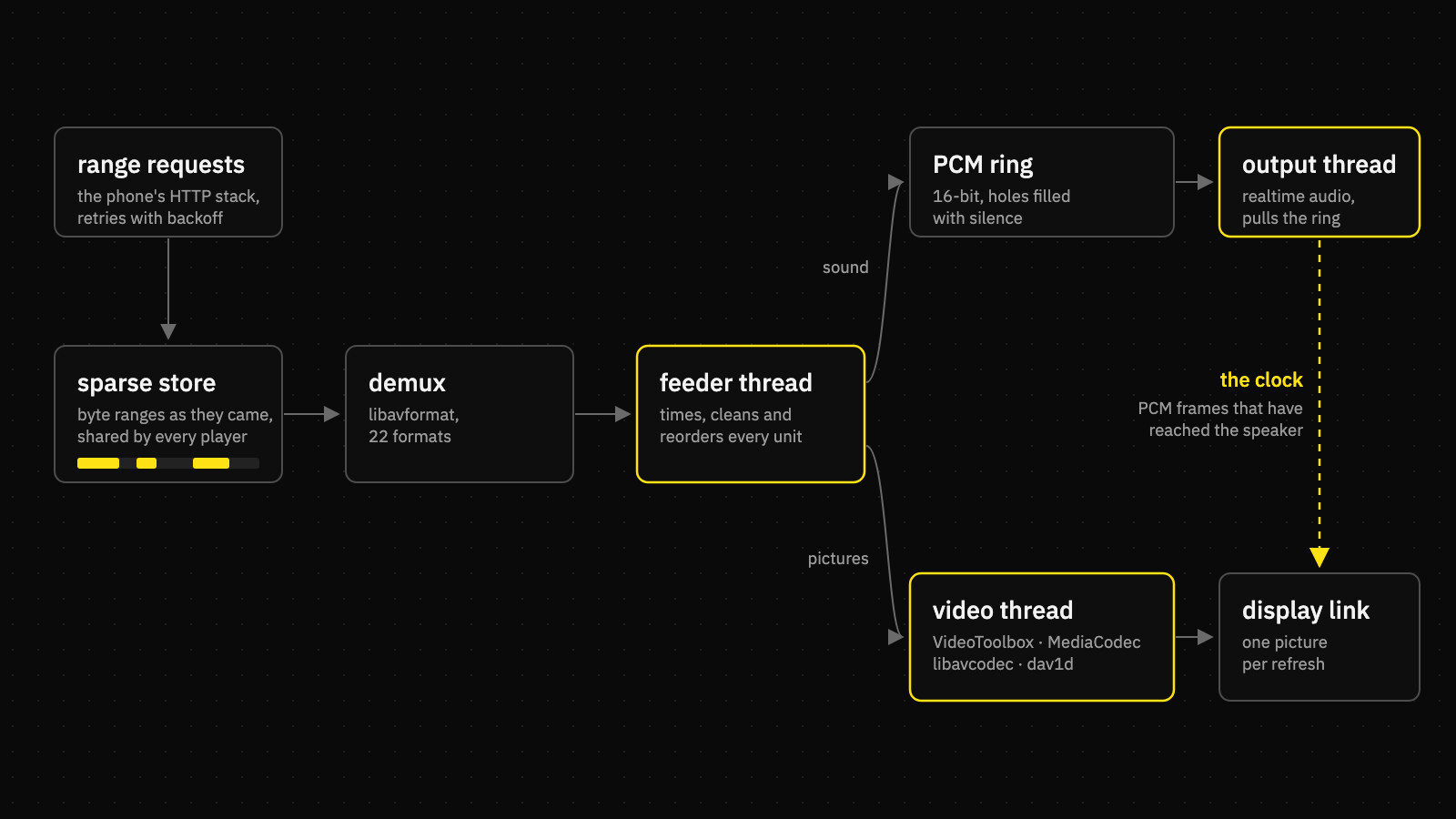
A player has four threads. The feeder demuxes the source, decodes the sound into a PCM ring and queues every video access unit, cleaned and timed. The video thread decodes pictures and starts, stalls and ends the clock. The output thread is the platform's realtime audio callback; it pulls PCM through atomics only and never takes a lock. The host is the app: bytes arriving from the network, the display asking for a picture, and the user's commands. One mutex guards the engine's state, but libavformat is never called while it is held: its reads come back in through Kino's I/O callback, which takes the mutex itself.
The speaker keeps the time
Most players run a system clock and nudge the sound to match it. Kino goes the other way: the clock is the sound itself, measured at the speaker. Every pull from the output thread leaves a record of which device frame it started at, how many of its frames carried real sound rather than silence, and when its first frame reaches the speaker, output latency included. Media time at any instant is the number of real PCM frames that have reached the speaker by then, divided by the sample rate. An underrun, a stall or a Bluetooth headset's 200 ms of latency moves the clock by exactly as much as it moves the sound. Picture and sound can't drift apart, because there is no second clock for them to drift between.
Pictures follow that clock. On Apple, the display link asks the engine for the picture whose presentation time is nearest the refresh it is about to show, and gets back a retained pixel buffer or nothing (keep the current one). On Android, decoded pictures stay inside MediaCodec, and each is released to the window with its own presentation time a few milliseconds ahead. The compositor then puts it on the right vsync with no copy at all. Kino holds at most two of those pictures, because FFmpeg's MediaCodec wrapper busy-waits when every output buffer is held, and some VP9 decoders have only four.
Choosing the nearest picture has a trap. A picture that lands right between two refreshes flips between them on the clock's smallest noise, beat after beat. So the choice has hysteresis: once pictures have been landing early, the next one may land up to an eighth of a refresh earlier still, and the same goes for late. A steady phase keeps one beat, and only a real drift moves it.
A 30 fps video on a 60 Hz screen should hold every picture for exactly two refreshes. If one is held for three, someone will see it.
The cadence check, which runs on every file in the test suite
Bytes, not URLs
Kino never hands a URL to anything. It asks the host for byte ranges and writes what comes back into a sparse store: one sparse file per URL holding only the ranges that arrived, plus a map beside it listing them. Every player in the process shares a URL's store, and the store outlives the app run. Seeking back, watching a second time, or opening the same clip in another player reads from disk instead of the network, and memory never holds media bytes. The map is always written after the bytes it lists, so a crash can lose a download but can never claim one that isn't on disk. Stores nobody holds are evicted, least recently used first, once they pass a 512 MB budget.
The fetcher is built for a phone on a bad network. Downloads run 10 MB ahead of the reader and no further. A fetch that brings no byte for 15 seconds is asked again. One that never sent its first byte is retried after 8, because a connection that never answered is not a lull. Failures back off exponentially from 250 ms to 8 s. A seek cancels the open-ended download it left behind, and only the gaps the store is missing are ever requested. If the whole pipeline makes no progress for 30 seconds, a watchdog re-seeks to where the clock is.
Opening a file costs as little as possible. The probe runs with an empty codec whitelist, so libavformat reads the stream tables without opening a single decoder. The "ahead" the app shows on its buffer bar is the larger of what has been read and what is already stored, worked out through the file's own index.
Prefetch without a player
A feed downloads the clips after the one on screen so they start from disk when you swipe to them, and it does this without opening a decoder for each one. A prefetch writes straight into the same store a player reads. For a recording, it fetches exactly what a player opened at a given moment will read in its first stretch: the segment's first 32 KB (the buffer libavformat fills with tables before it seeks; 16 KB left the player one round trip short), then the bytes from the keyframe at or before that moment to the first keyframe after it. In the harness, a player opened on prefetched bytes shows its first picture in about 60 ms, and none of its fetches asks for a byte it already has.
Scrubbing by keyframe
A show replay is a long recording cut into MPEG-TS segments, and when your thumb moves along its timeline, Kino doesn't seek a demuxer. A server-side scan of the recording lists every keyframe's byte offset and length within its segment. Under the finger, Kino fetches just that range (80 to 200 KB), decodes that one picture on its own and shows it. It then fetches the next three keyframes in the direction the finger is moving. The last 48 keyframes a scrub read are kept as access units, so dragging back over them never touches the network. When you let go, playback starts from the exact frame you were looking at.
Thumbnails take the same path without a player: fetch one keyframe's range, decode it, and hand back a JPEG on Apple or RGBA rows on Android. A video's poster is just its first keyframe decoded at the width it will be drawn.
Speed without a stall
Holding a finger on a clip plays it at 2×. Speed runs through a time-stretcher that keeps the pitch, so a seller talking fast still sounds like the seller. The hard part is the change itself. The obvious approach, a seek to "now" at the new speed, decodes again from the last keyframe and freezes the picture for a fraction of a second on every press and every release.
Kino changes only the sound. The video decoder, the pictures it has made and the queued video all carry on. The PCM ring is cut 60 ms past what the output has already pulled. Everything before the cut plays at the old speed, and the new speed's sound is written from the cut on. The clock maps each side of the cut at its own rate, so it never stops running. That matters most on Bluetooth: if the engine waited for the new sound to be heard before moving the clock, the picture would freeze for the headset's whole latency.
Loops are gapless the same way. At the end of a pass, the feeder opens the first segment again on the same timeline, one pass length further on, and the clock wraps for the app. The sound of a file is cut at the file's declared length, because what an AAC decoder outputs past it is encoder padding, and that padding would push every later pass a little later.
Cleaning what arrives
Live video passes through a lot of hands before it is a file, and not all of them are careful. Kino cleans every H.264 and HEVC access unit before a decoder sees it:
- Junk split off at access unit delimiters. A cloud mixer upstream occasionally leaks RTP aggregation units (H.264 NAL types 24 and 0) into the elementary stream, followed by random bytes, sometimes inside the same PES as a real IDR. Any part of a unit that carries a NAL type Annex B never uses is dropped whole, and the rest decodes.
- Dolby Vision layers stripped. An iPhone's HDR video carries Dolby Vision in HEVC NAL types 62 and 63 in every access unit. Kino removes them, and the base layer decodes like any other HEVC.
- Uneven stamps evened out. The same mixer stamps two pictures 1 ms apart and then leaves a 66 ms gap. Each picture is placed no sooner than nine tenths of a frame period after the previous one, and never more than one period past its own stamp.
- Segments joined on their real timestamps. A recording's manifest and its segments' own timestamps disagree by tens of milliseconds per segment. Placing each segment where the manifest says leaves a hole or an overlap in the sound at every join. Kino keeps the previous segment's offset while the source and the clock still agree to within a second.
- Silence where sound is missing. Sound is the clock, so a hole in it would stop time. Holes are filled with silence and overlaps are trimmed, counted in samples.
22 formats
Kino started with what phones and browsers make: MP4 and MOV, MPEG-TS, Matroska and WebM, Ogg, AVI, and the usual audio files. Sellers don't only film on phones, though. Cameras write MXF and AVCHD, old footage lives on DVDs, and desktop streaming tools record FLV. So the build grew twelve more demuxers, along with the decoders those containers carry: DNxHD/DNxHR, Sorenson Spark, DVD and Blu-ray LPCM, and IMA and Microsoft ADPCM.
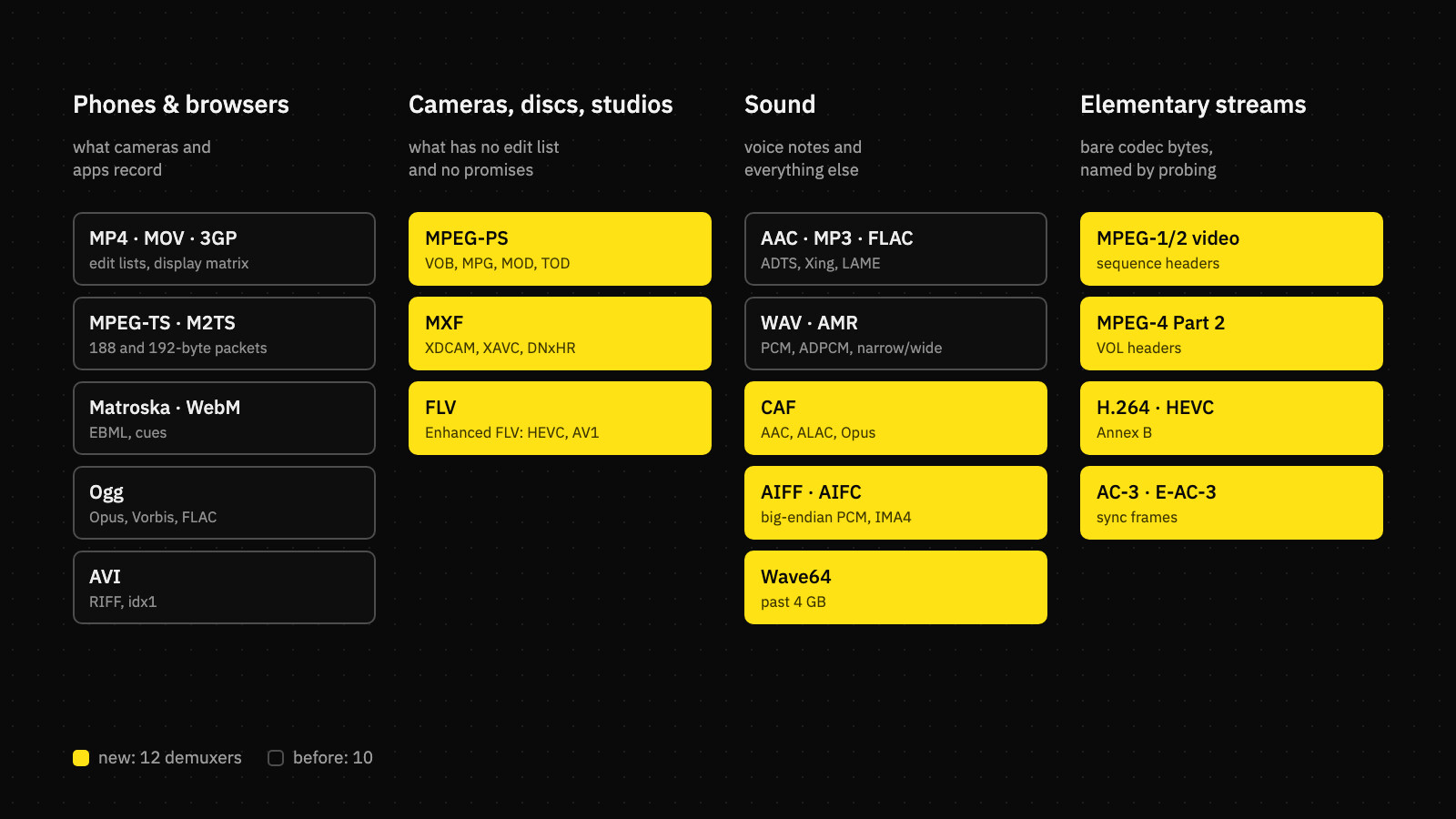
The build stays LGPL-only, with shared libraries so they can be relinked as the license asks. On Android, the twelve new formats cost about 140 KB per architecture. The new formats also exposed four bugs, each one worth the whole exercise:
- A stripped build can't identify a program stream. A DVD has no stream table, so libavformat names a stream's codec by which raw demuxer's probe claims its bytes. Without those demuxers, the DVD has no video. The fix was six demuxers nobody would ever open a file with.
- MPEG-2 anchors without a PTS. In a program stream, only the first picture that starts in a PES gets a timestamp. An I or P picture shown at its decode time lands three frames early. Kino now holds such an anchor until the next one arrives, whose decode time is the held anchor's presentation time. MediaCodec reads a missing timestamp as zero, so this has to be fixed before any decoder sees the packet.
- Seeks that land past their keyframe. Containers with no index (or MXF, whose index marks every I picture) leave the reader after the keyframe it needs. Kino reads where it landed, steps back 1, 2 and then 4 seconds until it starts at a real IDR or IRAP, and decides that by NAL type, not by the container's flag.
- Parameter sets nobody kept. A full FFmpeg quietly lifts SPS and PPS out of the first keyframe with a bitstream filter. In a trimmed build that filter is missing, and every stream that relies on it plays only from the start.
The other direction: re-encoding uploads
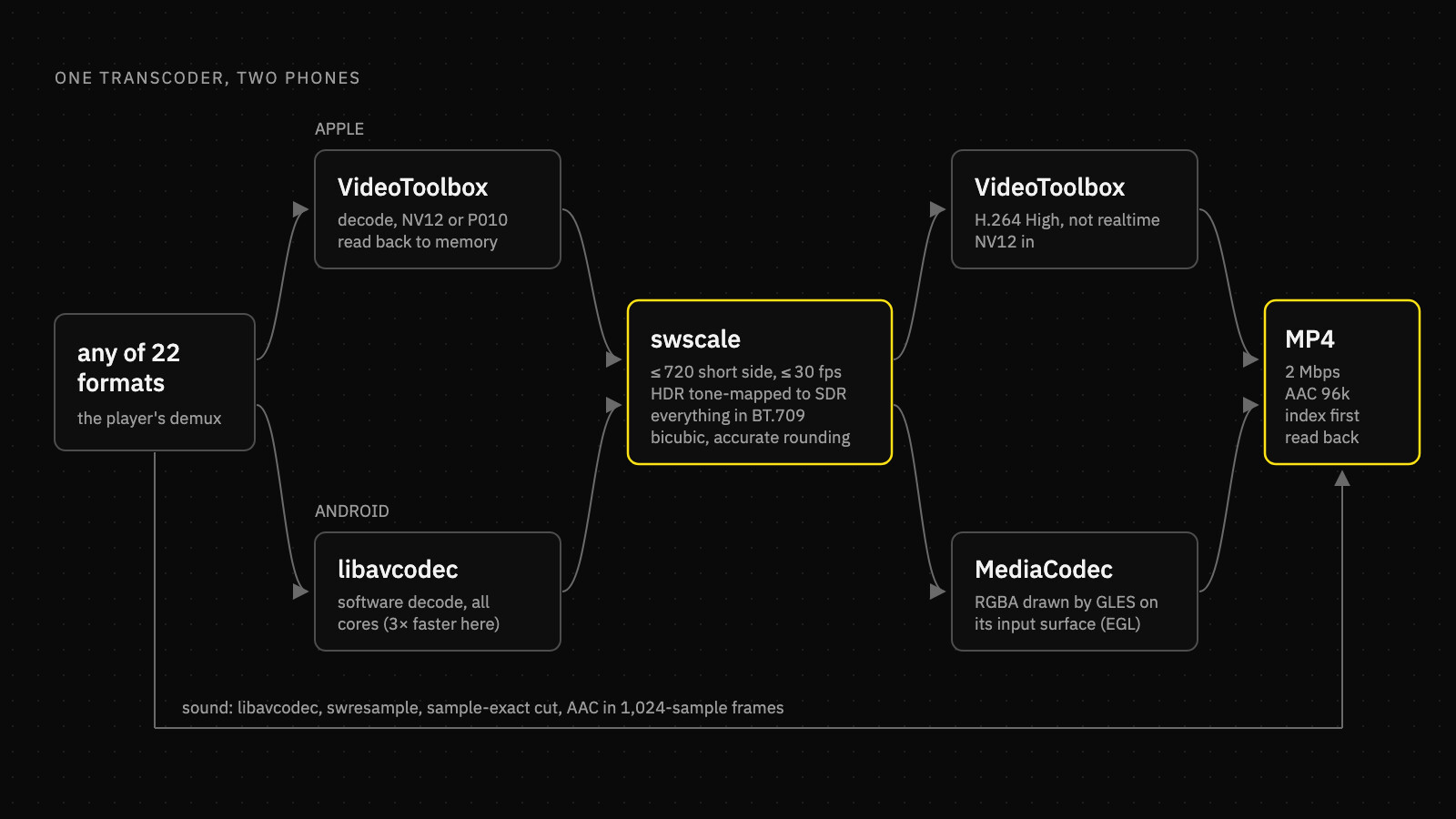
Until this week, iOS and Android each compressed uploads with their own platform framework. That meant two code paths, two sets of quirks, and two different-looking results, including Android HDR10 that went up flat and grey. Now both phones run the same transcoder in Kino. It reads with the player's own demuxer, so anything the engine can play can be uploaded, from an iPhone's Dolby Vision HEVC to a camera's MXF. Out comes one predictable file: H.264 High at 2 Mbps, no more than 720 pixels on the short side and 30 fps, AAC at 96 kbps, in MP4 with the index at the front so playback can start before the download ends.
Decoding: the fast path isn't always the hardware
On Apple, VideoToolbox decodes into its own NV12 buffers (P010 for 10-bit), which are read back for scaling. On Android, the obvious choice, MediaCodec decoding into memory, turned out to be the slow one. Its output comes in vendor-specific layouts that have to be copied out slowly, and on Qualcomm chips a CPU-readable image reader won't take its pictures at all. FFmpeg's own decoders, running frame and slice threads on every core, re-encode a 12-second 4K60 HEVC clip on a Galaxy S26 Ultra in 3.8 s. The same clip takes 12.5 s through MediaCodec. So Android decodes in software and saves the hardware for the encoder. On either platform, if a hardware decoder fails before the first picture is encoded, the job quietly starts again in software.
Encoding: a texture onto a codec's surface
On Apple, VideoToolbox's H.264 encoder runs through libavcodec in its non-realtime mode, which gives it time to spend on quality. On Android, MediaCodec's encoder is fed through its input surface. Kino creates an EGL context with a recordable config on that surface, uploads each converted RGBA picture as a texture, draws it as one full-screen quad, and stamps it with eglPresentationTimeANDROID before swapping. The encoder never sees a CPU buffer layout it has to guess at. There is one rule this code must never break: no eglTerminate. The EGL display is per process, and the app's own renderer is using it.
Both encoders run with no B-frames, a keyframe every two seconds, and BT.709 written into the stream. The bitrate is an average with a ceiling: no second of the file may go past 1.5 times the target. An average alone lets grain or sensor noise run a file to six times its intended size. Encoders that don't offer High profile fall back to their default.
Picture and colour
Scaling and conversion use swscale's frame API, which reads each picture's own colour description instead of trusting the stream header: bicubic, accurate rounding, all cores. Frame rate drops by decimation. A picture is kept only if at least fifteen sixteenths of the target interval has passed since the last kept one, so 60 fps becomes an even 30 and 30 stays untouched. Pictures that don't state their colour are treated the way cameras actually write them: BT.709 at 720p and up, BT.601 below.
HDR is where most transcoders go wrong. HLG was designed to look right on an SDR screen as it is, so its transfer is read as BT.709 and only the wide gamut is mapped down. That matches exactly what iOS uploads always looked like. PQ (HDR10, and the base layer of Dolby Vision) has to be tone-mapped, and swscale does that perceptually from the mastering display's peak brightness. A file that doesn't state a peak is assumed to reach 10,000 nits, which leaves every mid-tone dark. Kino caps the peak at 400 nits, which puts PQ's 203-nit reference white close to SDR white, as ITU-R BT.2408 recommends. Highlights above it roll off and only the brightest clip.
/* PQ: tone-mapped from a peak of at most 400 nits, so its reference
   white (203 nits) lands near SDR white; HLG is shown as it is. */
if (s->color_trc == AVCOL_TRC_ARIB_STD_B67) {
    s->color_trc = AVCOL_TRC_BT709;
} else if (s->color_trc == AVCOL_TRC_SMPTE2084) {
    AVMasteringDisplayMetadata *md = mastering(s);
    if (md && (!md->has_luminance || av_q2d(md->max_luminance) > TX_PQ_PEAK)) {
        md->max_luminance = av_make_q(TX_PQ_PEAK, 1);
        md->min_luminance = av_make_q(0, 1);
        md->has_luminance = 1;
    }
}
sws_scale_frame(x->sws, x->pic, s);   /* intent: perceptual */
Sound, rotation and trimming
Sound is placed on the output's timeline by its first timestamp. Encoder priming before zero is dropped, the cut lands on the exact sample, and swresample feeds a FIFO that hands the AAC encoder whole 1,024-sample frames, with one short frame at the end. A phone video's rotation isn't baked into the pixels: it is carried through as the display matrix, which every player in the app already applies. A clip trimmed in the editor is cut during the same pass, with no second encode. And a file that already fits (MP4 with H.264 or HEVC, AAC or no sound, small enough and within 1.4 times the bitrate) is sent as it is, untouched.
A job that can't hang
Platform encoders sometimes stall forever without returning an error. So a transcode runs on its own detached thread, and the caller's wait is the watchdog. A job that makes no new picture for 20 seconds, or runs past six times the video's length (90 seconds at least), is declared failed, and its thread is left to finish on its own. The engine also refuses to trust its own success. Before it says "written", it opens the output again and checks for an H.264 stream of the size it made, as long as the input to within a second or a tenth. The app keeps each platform's old compressor only as a fallback for that rare failure.
How we know it works
None of this is checked by watching. The test harness drives the real engine on a Mac, with a virtual 60 Hz display link and a tap on the audio output. Every synthetic test file flashes white on the first frame of each second and beeps a 1 kHz tone at the same instant, so the harness can measure, pair by pair, how far each beep lands from its flash and how long every picture stayed on screen. The transcoder is tested the same way, end to end: it re-encodes a file, and the player then plays what was written through the same flash-and-beep checks.
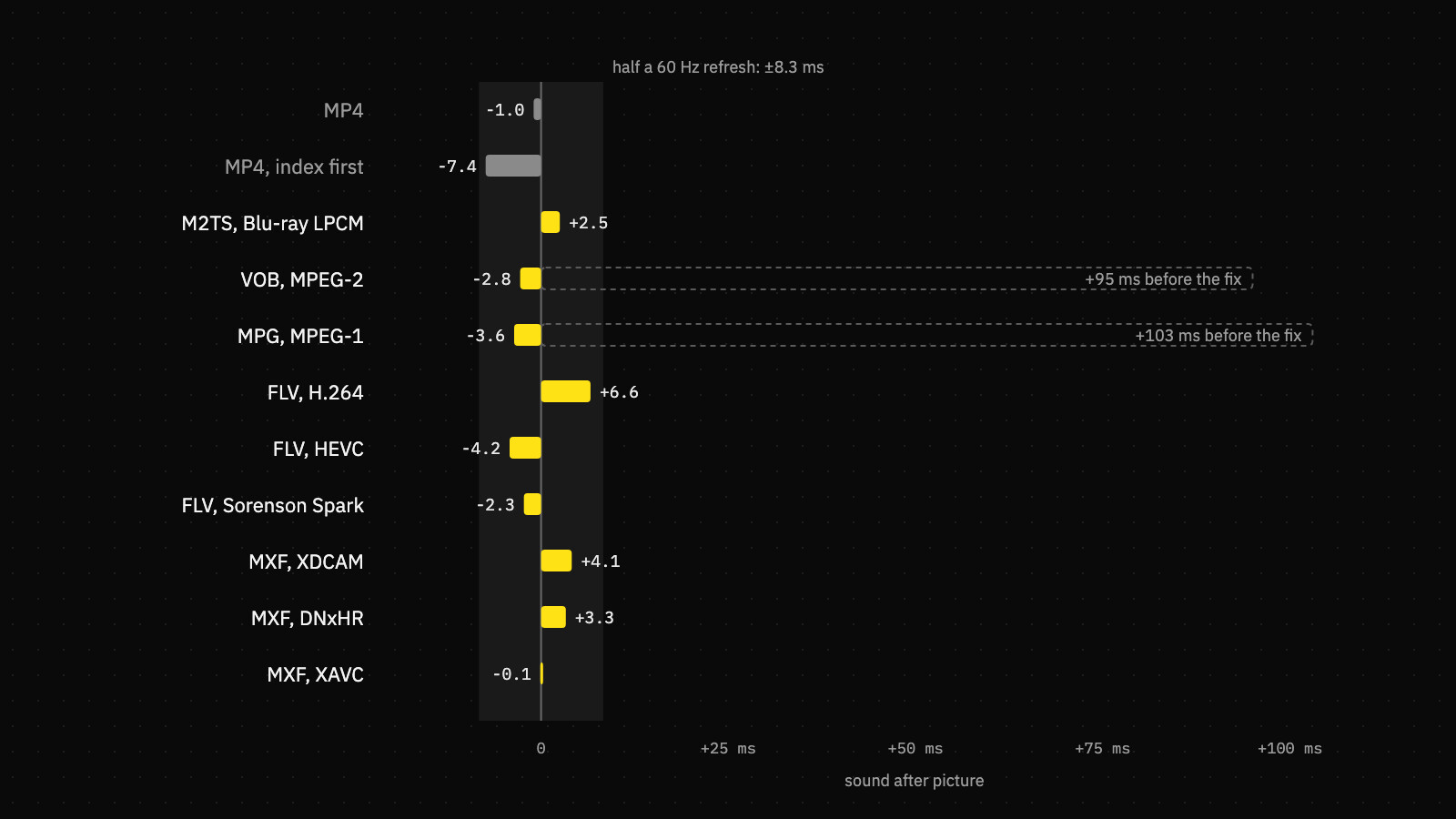
- 783 checks across playback, seeks, scrubbing, prefetch, posters, loops, speed changes, sound-only files, transcodes and failures, all passing.
- A/V offset within 7.4 ms on every container, measured from the speaker's clock.
- Transcoder media: 1080p60, HLG, PQ, 4K60 under heavy noise, every container, a trim, a rotation and the HDR levels, each one re-encoded and then played back.
- On a phone: the same scenarios run as a native binary on an Android device, with results pulled back to the Mac harness. On the Galaxy S26 Ultra, all 16 kinds of input were written and every one plays back in sync within 8 ms at the right cadence.
- Faults injected: 5xx responses, dropped and stalled connections, 200 sent in answer to a range request, short bodies, missing segments, and a decoder taken away mid-play.
- Damaged media: bit flips, cut PES packets, lost tables, garbage NAL units, and files that aren't media at all.
- Sanitizers: the engine also runs under AddressSanitizer with UndefinedBehaviorSanitizer, and under ThreadSanitizer.
- Fuzzing: a mutation fuzzer feeds damaged files through the demuxers, the access-unit cleaner and the whole engine. It ran 72,819 rounds without a crash.
One finding from the device runs is worth passing on. A native test binary started over adb has no binder thread pool, so Android's Codec2 never delivers its results and every encode looks hung. App processes get that pool for free. The test starts one through ABinderProcess_startThreadPool, and the hang turns out to have been in the test all along.
A transcoder is a parser facing files from strangers, and it is the first thing to open a video you pick from your phone. That makes the fuzzer the part we care about most.
What it adds up to
A replay you scrub shows the exact frame under your thumb. A clip held down plays at 2× with the pitch kept and the picture never hitches. A second viewing costs no data, and the next clip in a feed starts from disk. A recording with a hole in it plays straight through the hole. A video from a camera, a disc or a streaming tool plays in step and seeks to the frame you asked for. And any of it can go up from either phone and come out the same: small, sharp, in the right colours and in sync. One engine, about 7,000 lines of C, built to scale to a million uploads.